Understanding Object-Oriented Programming in JavaScript

As your JavaScript programs grow larger, writing everything as a long, with a long list of variables and functions gets tricky. We find ourself repeating code or losing track of how different pieces of data relate to each other.
This is where Object-Oriented Programming (OOP) comes to save us
What is Object-Oriented Programming (OOP)
OOP is a programming style (paradigm) that makes code to be around objects instead of only functions and logic. It allows you to bundle related data and the actions that operate on that data into single, reusable, and easy-to-understand classes.
Real-World Analogy: Blueprints and Objects
To understand OOP, it helps to look at how things are built in the real world.
Imagine a car factory. Before the factory can build a car, engineers design a blueprint. The blueprint is nott a physical car it is a piece of paper that shows the properties (color, number of doors, engine type) and operations (start, stop, accelerate) that a car should have.
Once the blueprint is ready, factory uses it to build physical cars. You can use that single blueprint to build a red car, a blue car, or ten thousand black cars.
What is a class in JavaScript
A class is a special syntax in JavaScript used to create blueprints. It defines what properties and methods every object created from this class will have.
Here is how you declare a class :
class Car {
  // We will write in this article
}
The constructor Method
When you build a car in a factory, someone has to physically assemble it and paint it the color customer ordered. In JavaScript, the constructor method is the assembler.
The constructor is a special function that runs automatically the moment we create a new object from a class. It is used to set up initial values of the objects properties.
class Car {
  constructor(brand, color) {
    this.brand = brand; // 'this' refers to the car being built
    this.color = color;
  }
}
Note: Remember that this refers to the current object being created or used.
Creating objects using classes
Now that we have Car blueprint, we can create car objects using new keyword. Creating an object from a class is called instantiation (because we are making an instance of the class)
// Using 'new' keyword to call the constructor
const myFirstCar = new Car("Toyota", "Red");
const mySecondCar = new Car("Tata", "Blue");

console.log(myFirstCar.brand); // Output: Toyota
console.log(mySecondCar.color); // Output: Blue
Methods inside a class
Objects dont just hold data, they usually do things. You can add functions inside your class to give your objects some operations that it can perform. When a function belongs to an object, we call it a method.
class Car {
  constructor(brand, color) {
    this.brand = brand;
    this.color = color;
  }
  drive() {
    console.log(`\({this.color} \){this.brand} is driving.`);
  }
}

const myCar = new Car("Tata", "Silver");
myCar.drive(); // Output: Silver Tata is driving.
Idea of How Relation between Class and Objects Looks like
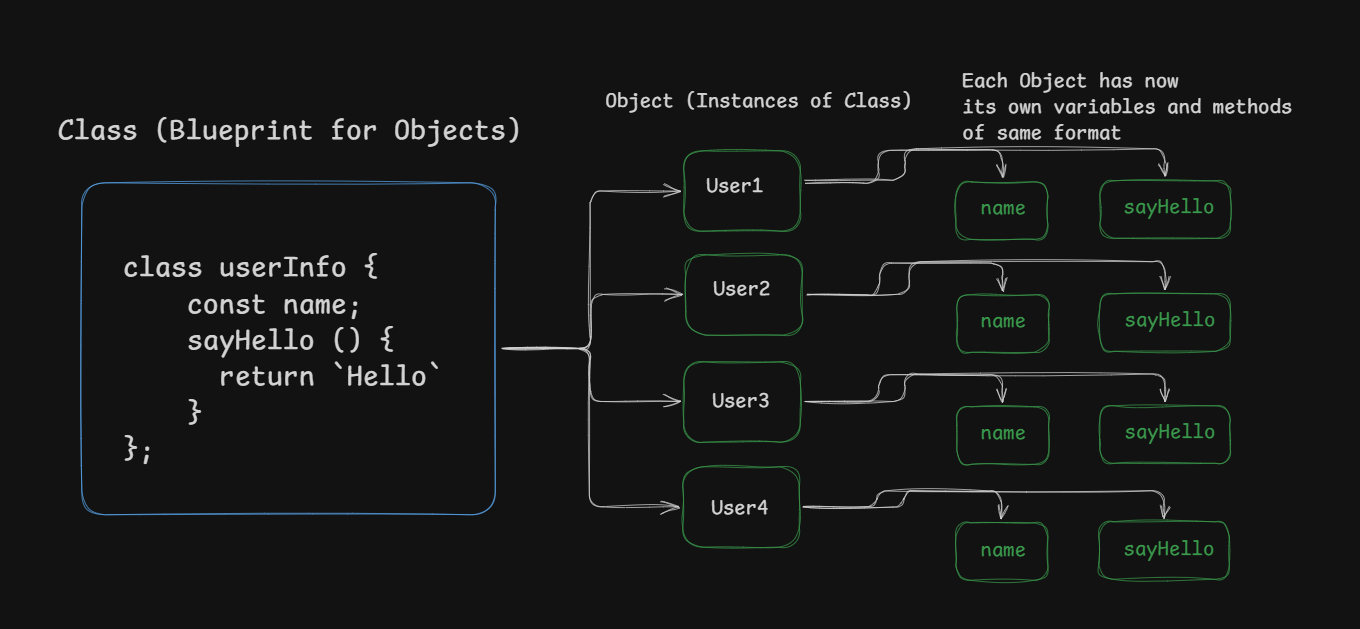
A Idea of encapsulation
Encapsulation is one of the core concepts of OOP.
In simple terms, encapsulation means bundling data (properties) and methods that use that data into a single, enclosed unit (object).
Think of a medicine capsule: the medicine (data) is safely enclosed inside the outer shell.
In our code, all information about myCar and the ability to drive() are neatly bundled. We don't have a driveCar() function floating around in our code, it belongs to the Car objects. This keeps our code organized and prevents different parts of our program from interfering with each other.
Test Your Skills (Assignment)
Ready to try building your own blueprint?
Create the Blueprint: Write a class named
Student.Add a Constructor: Give the class a
constructorthat accepts two parameters:nameandage. Store these values usingthis.nameandthis.age.Add a Method: Create a method inside the class called
introduceSelf(). When called, it should print a sentence to the console like: "Hi, my name is [name] and I am [age] years old."Create Objects: Use the
newkeyword to create at least two different student objects with different names and ages.Test It: Call the
introduceSelf()method on both of your new student objects to see the result!
Conclusion
Object Oriented plays a vital role when codebases become larger and we need a format for our objects with necessary methods directly inherited from the class.
Hope this article adds value, Thanks for Reading.

