Understanding Network Devices

How Internet reaches to Us ?
Ever wondered how Internet is provided to us, let’s break it down today.
The internet feels like it is being transmitted in the air, but it is actually a very big physical network of cables, hardwares and protocols that work together to get us access of Internet.
The core : It is the network of fibre optic cable that are buried underground or laid across the ocean floor that connect different continents and countries. These cables are owned by major communication companies, in India it is owned by Tata Communications.
Your ISP : ISP is Internet Service Provider (Airtel, Jio or VI in India), these ISP’s connects with the backbone. These ISP’s then builds a local network of smaller cables (fiber, copper or coaxial) around our neighbourhood.
Modem : The cable from street enters our home and is plugged into a modem, the role of the modem is to receive analog signals from the cable and convert it into digital signals that our computer can understand.
Router : Once the signal is converted into a digital signal, it now goes into the router. The router that distributes this across your devices like phone, laptop, Smart TV etc.
What is Modem ?
A modem (modulator - demodulator) is a network device that connects your local network to the internet by converting signals.
We can see modem as a translator from analog to digital. For example if you speak english/hindi and the other person speaks japanese we need a translator to establish communication between us so that translator for this network system is Modem

In simple words - Modem is a network device used to connect a local network to the internet. It converts digital data from computers into signals suitable for transmission over ISP lines and converts incoming signals back into digital form. Thus it acts as a bridge between the network and the internet.
What is Router ?
Router is a hardware whose primary job is to direct data packets between different computer networks most commonly between your home network and the internet.
While a modem brings the internet to our house, the router distributes it inside our house to all our various devices.
How a Router Directs Traffic
Data comes to the router in small packets.
The router reads the destination IP address on the packet.
It checks its routing table (a list of paths)
The router choses the best path
It sends the packets to the right network or device
Switch vs Hub
While both Hub and a Switch are used to connect devices in a Local Network. They both handle data with very different levels of intelligence.
Hub
A hub is the simplest way to connect computers, it just sends data to every computer on the network. Every computer receives data, even if it wasn’t for them. This creates a massive amount of unnecessary traffic, making network slow and secure. A hub is like a person shouting a message to everyone.

Switch
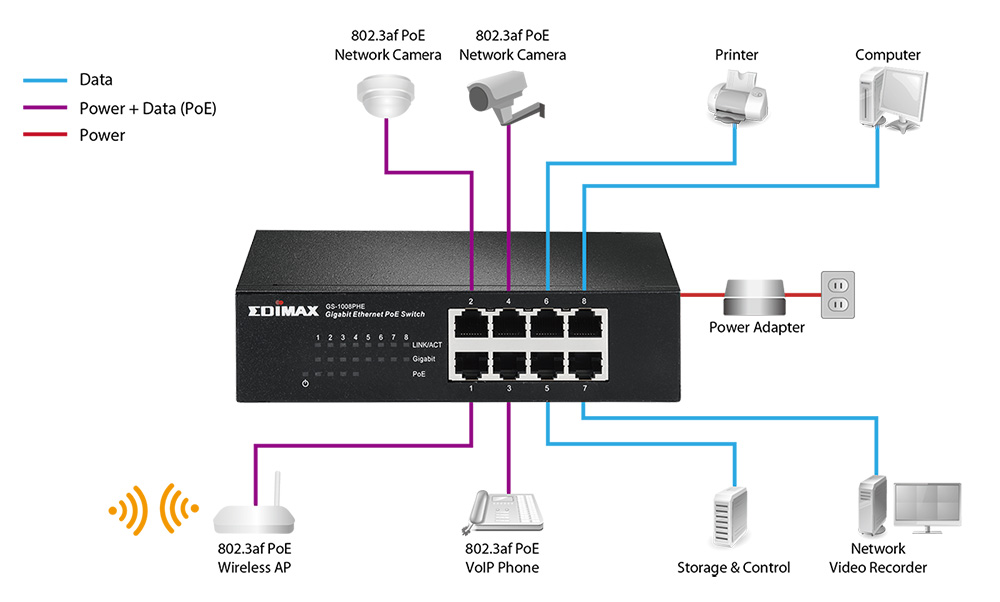
A switch is more intelligent and is the standard for modern local networks. It keeps track of unique MAC addresses (physical hardware IDs) of every device connected to it. A switch receives data and looks at the destination address and sends it only to the specific port where that device is present. Data travels directly from the sender to receiver and this reduces traffic, prevents data collision.
It is like a specialized courier who has a list of everyones address and delivers the data directly to the correct address.
What is Firewall
A firewall is a guard at a room, it check everything going inside and coming outside. It monitors and controls network traffic based on security rules.
A firewall acts as a barrier between a trusted network and an untrusted network, it inspects every packet of data that is transmitting.
Filtering : It looks the source, destination and type of data. If it founds malicious the firewall drops it immediately.
Packet Inspection : Advanced firewalls also checks the content inside the packet to ensure it doesn’t contain any malicious code.
Stateful Tracking : Checks who initiated a conversation, if a server sends data without you requesting it firewall blocks it immediately.

Why security lives here ?
Security lives here because firewall is the person that checks everything that is being transferred.
It also ensures
Prevention from unauthorized access
Blocking malicious content
Protecting our Services
Outbound Control
| Type | Analogy | Best For... |
| Packet Filtering | Checking the "From" address on mail. | Basic home routers. |
| Stateful Inspection | Remembering who you invited over. | General network security. |
| Proxy Firewall | A middleman who picks up your mail for you. | High-security corporate networks. |
| Next-Gen (NGFW) | A guard with an X-ray machine and a memory. | Detecting complex modern threats. |
What is Load Balancer ?
A load balancer is a device or software that acts as a traffic inspector. It sits in front of the server and directs the clients to whichever server is best.
When a user tries to request a service it doesn’t interacts with the backend directly, instead it interacts with load balancer and that load balancer send the user to the best possible server.
Load Balancer can use multiple strategies to divide the load
1. Round Robin - Connects with servers iteratively.
2. Least Connection - Connects with the server that has least no. of connections
3. IP hash - Connects a specific user to same server everytime (useful to keep user logged in one machine)
Why it is a Medicine for Scalable Systems
Because
It prevents single point of failure
It ensures efficient resource use
It handling traffic spikes

How all these Devices work together
| Device | Connection Order | Primary Goal |
| Modem | 1st (From ISP) | Signal Translation |
| Router | 2nd | Network Management & IP Assignment |
| Firewall | 3rd (Inside Router) | Access Control & Security |
| Switch | 4th | Direct Device-to-Device Connection |
| Load Balancer | 5th (In front of servers) | Scaling & Traffic Distribution |
Summary
All these devices modem, router, firewall, switch and load balancer work together to deliver internet to us fast and secure.
Thanks for reading.

